Culling Systems
以前记录的旧文档,先简单整理一下,免得遗失

剔除方法
- Frustum Culling
- Software Occlusion Culling
- Hardware Occlusion Queries
- HZB Occlusion Culling
- Precomputed Visibility
- Others
- Geometry shader Based: Instance culling using geometry shaders
- Two-phase occlusion culling (part 1)
- https://web.archive.org/web/20221104125234/https://cesium.com/blog/2022/08/18/occlusion-culling-cesium-for-unreal/
To implement occlusion culling in practice, each object should have a precomputed, well-fit, bounding volume that contains all of the geometry. Generally, oriented bounding boxes (OBBs) fit best (e.g., buildings can often be bound tightly with OBBs). Axis aligned bounding boxes may have a slightly worse fit, but may sometimes be preferred due to easier integration into scene octrees. Bounding spheres are usually the worst fitting and lead to extremely conservative occlusion results.
UE4 Case in InitViews
UE4 culling的调试方法
- r.VisualizeOccludedPrimitives
- r.Mobile.AllowSoftwareOcclusion
- r.HZBOcclusion
Frustum Cull
UE4中Frustum放在FSceneRenderer中的Views(FViewInfo,继承自FSceneView)中,具体点就是通过FSceneView::ViewFrustum(FConvexVolume)变量来维护,包含6个平面。看一下平面的定义FPlane,UE4中一个平面的定义又XYZ的三维向量和常数W组成,从代码注释中可以看到,对应平面方程Xx+Yy+Zz=W的四个系数,注意W在方程式的右边。(X,
Y, Z)是平面的法线,-W为原点到平面的有符号距离(signed
distance,法线为单位法线的时)。 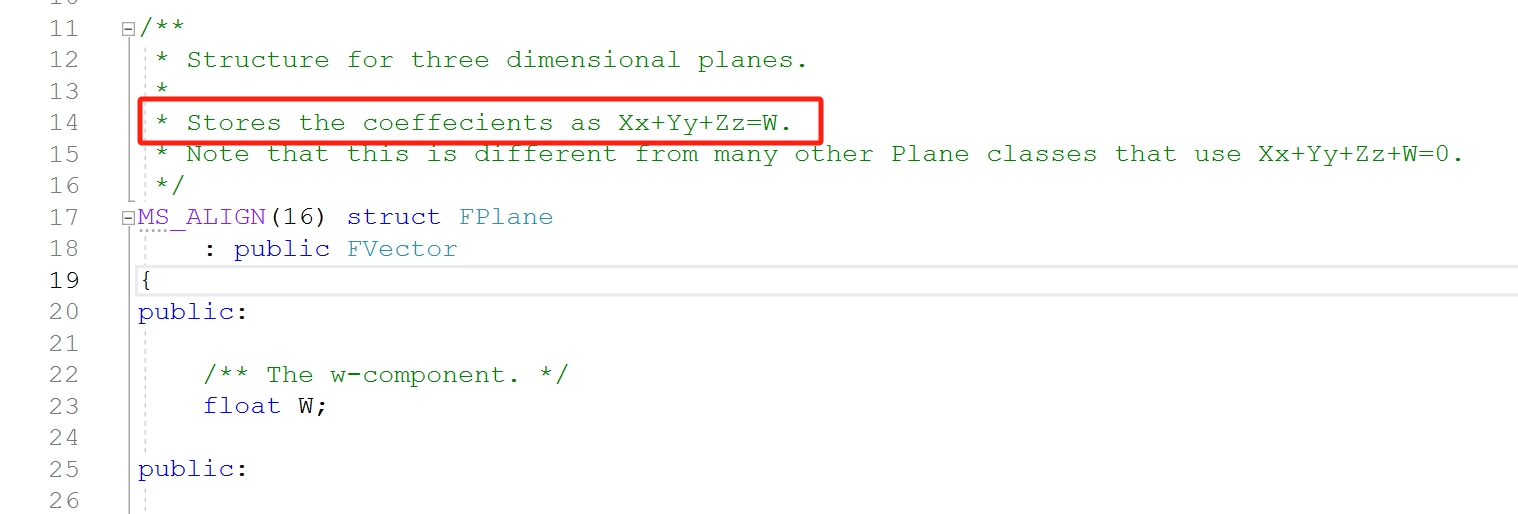
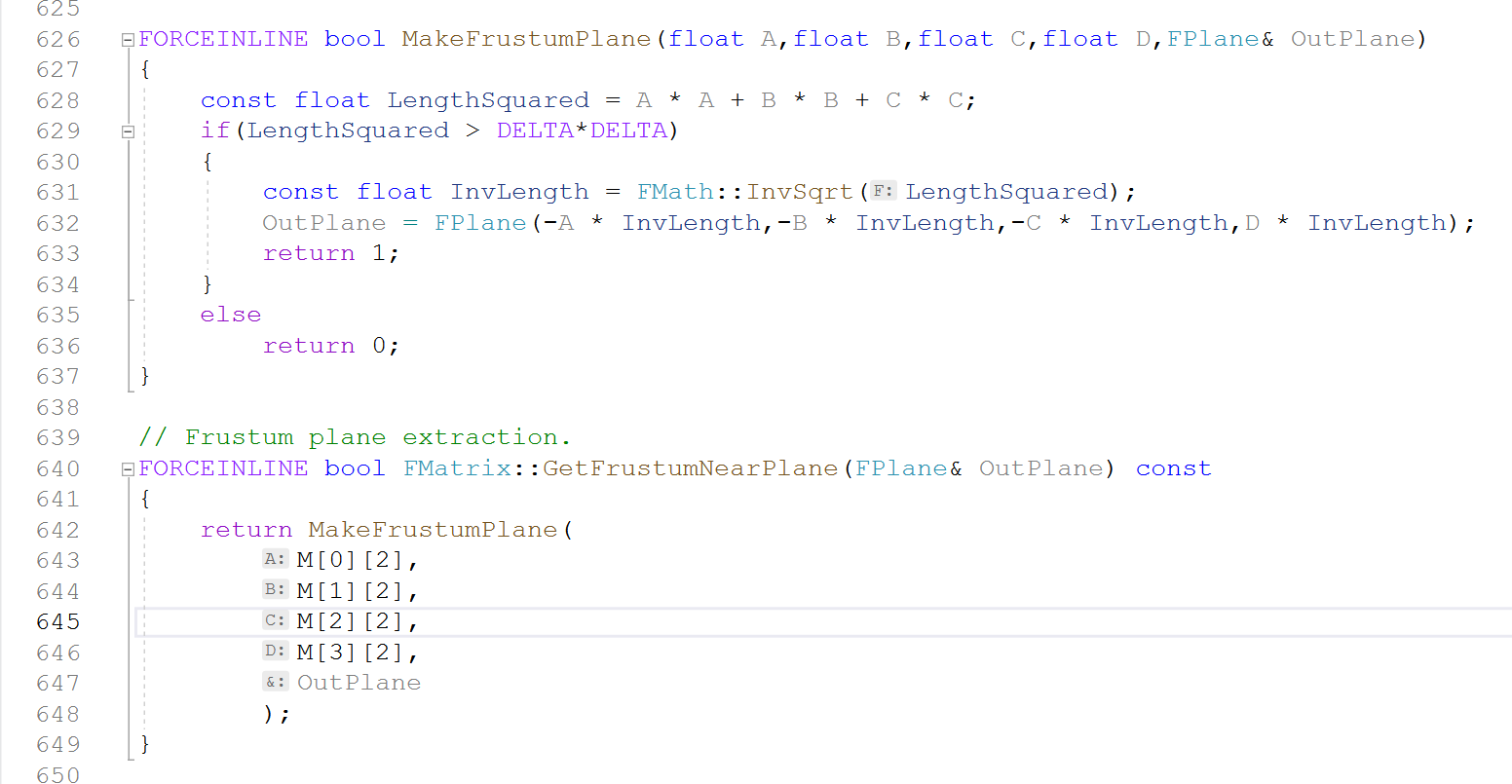
FSceneView::ViewFrustum通过SetupViewFrustum调用GetViewFrustumBounds完成初始化,从ViewProjectionMatrix矩阵中生成frustum的6个平面表达[1]。值得一提的是,平面的法向设置为朝的方向,这最终也影响FrustumCull剔除中实际的实现。
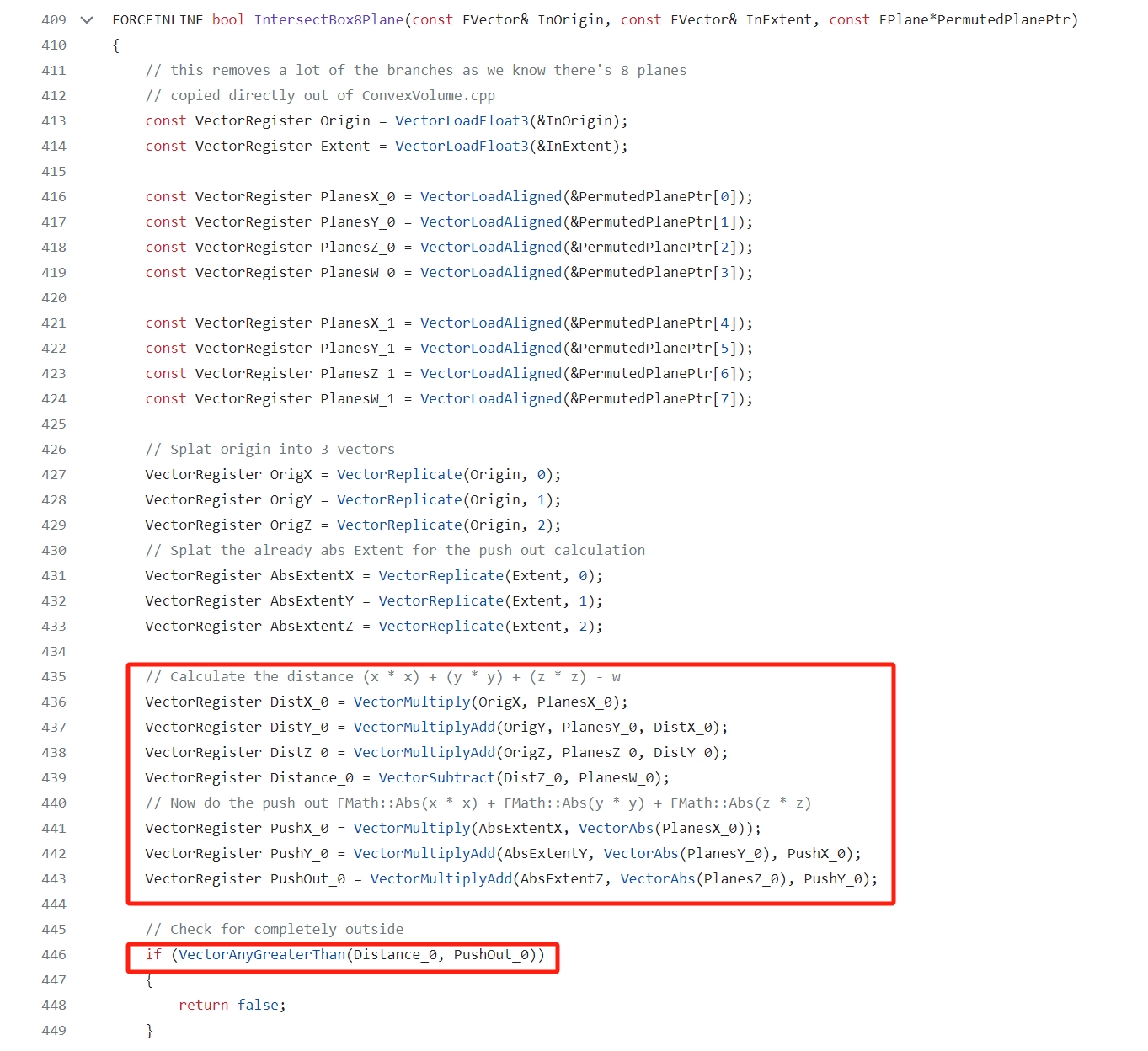
FrustumCull首先有一个以距离为Cull标准的distance cull,然后是frustum和primitive的包围盒(AABB, Bounding Sphere)的相交测试,这里只关注AABB的求教,BS的大同小异。naive的方法就是AABB的8个顶点遍历一遍,计算每个顶点和6个平面的距离,判断顶点是在平面的内侧还是外侧;如果8个顶点都在平面的外侧,那整个包围盒就都在frustum外面,就可以放心的剔除该包围盒对应的Primitive了。UE4的快速FrustumCull实现,在IntersectBox8Plane中实现使用了两处优化,1)SSE的加速,SIMD,同一条指令同时计算4个平面的相交;2)计算包围盒顶点的最大距离,如果最大距离的点在平面外侧,整个包围盒即在平面的外侧,但由于UE4中视锥体平面的法线是指向视锥体外侧的,这个优化就变成了求最小距离。 包围盒的中心点为\(`(O_x, O_y, O_z)`\),包围盒大小的一半为\(`(E_x, E_y, E_z)`\),顶点为\(`(O_x \pm E_x, O_y \pm E_y, O_z \pm E_z)`\),那么顶点到平面的距离为 \[(O_x \pm E_x) * X + (O_y \pm E_y) * Y + (O_z \pm E_z) * Z - W = (O_x * X + O_y * Y + O_z * Z - W) + (\pm E_x * X \pm E_y * Y \pm E_z * Z)\] 令\(`D_o = (O_x * X + O_y * Y + O_z * Z - W)`\), \(`D_e = |E_x| * X + |E_y| * Y + |E_z| * Z`\) 其中\(`(\pm E_x * X \pm E_y * Y \pm E_z * Z) \in [-D_e, D_e]`\), 包围盒顶点到平面的最小距离为\(`D_{min} = D_o - D_e`\), 如果\(`D_{min} > 0`\),包围盒必然在视锥体外,可以安全剔除。
Software Occlusion
Software Occlusion相关CVar设置 - r.Mobile.AllowSoftwareOcclusion:开启/关闭Software Occlusion。 - r.so.MinScreenRadiusForOccluder:设置作为遮挡物的最小屏幕半径,屏幕尺寸小于该值的物体将不能作为遮挡物。 - r.so.MaxDistanceForOccluder:设置作为遮挡物的最远距离,超出该距离的物体不能作为Software Occlusion的遮挡物。 - r.so.MaxOccluderNum:设置遮挡物的最大数量。 - r.so.SIMD:决定是否使用SIMD Routine。 - r.so.VisualizeBuffer:设为1后可以在左上角开启debug buffer,查看rasterized后的遮挡物
设置某个模型为Occluder,需要再Static
Mesh窗口设置LOD For Occluder Mesh指定使用使用哪一层的LOD来作为模型遮挡物的几何,并调用FStaticMeshOccluderData::Build生成对应SM的遮挡数据(UStaticMesh::OccluderData,FStaticMeshOccluderData)。
TConstSetBitIterator用来遍历TBitArray中所有被设置(set/true/1)的元素。
Software Occlusion针对FrustumCull后的场景,View.PrimitiveVisibilityMap已经包括了视锥剔除的结果,如此,SOC可能有一个小小的优化,如果遮挡物(Occluder)都已经被剔除了,SOC执行阶段收集到的遮挡数据就为空,就可以跳过被遮挡物(Occludee)的遮挡测试。
Refs
- https://www.rastergrid.com/blog/2010/10/hierarchical-z-map-based-occlusion-culling/
- https://www.rastergrid.com/blog/2010/10/opengl-4-0-mountains-demo-released/
- https://twitter.com/erkaman2/status/1062806036917166093 Software Occlusion
- https://www.intel.com/content/www/us/en/developer/articles/technical/software-occlusion-culling.html
- https://www.intel.com/content/www/us/en/developer/articles/technical/masked-software-occlusion-culling.html UE4 Projection Matrix Update
- https://blog.csdn.net/mrbaolong/article/details/117754296
- Editor: FEditorViewportClient::CalcSceneView(EditorViewportClient.cpp), FReversedZPerspectiveMatrix
- CalcSceneView/new FSceneView/SetupViewFrustum
- UE4坐标系统的单位为cm,GNearClippingPlane设定为10??实时渲染中的坐标系变换,UE4投影变换
- https://learn.microsoft.com/en-us/windows/win32/direct3d9/projection-transform#a-w-friendly-projection-matrix
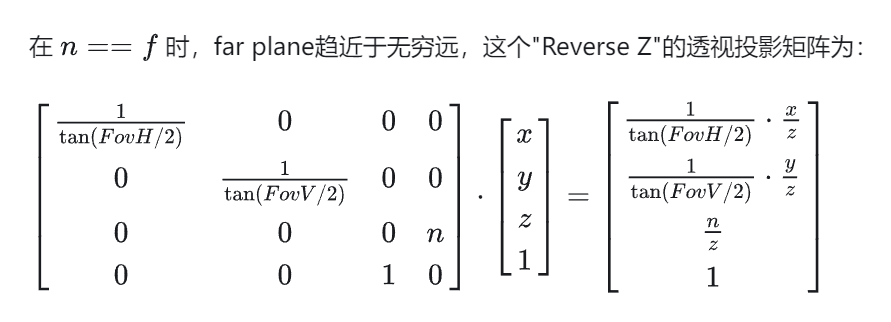
- Reverse Z投影矩阵可以通过正常模式的投影矩阵乘以一个‘z reversal‘矩阵来构造,在UE4透视投影矩阵和Depth Precision中都可以得到验证
\[P_{ReverseZ} = \begin{bmatrix} 1 & 0& 0& 0\\ 0 & 1& 0& 0\\ 0 & 0& -1& 1\\ 0 & 0& 0& 1\\ \end{bmatrix} * P_{Normal}\]
得到Reverse Z的透视投影矩阵,图中是转置后的矩阵
1 | // uint8 ProcessXFormVertex(const FVector4& XFV, float W_CLIP) |
W < W_CLIP时,clip space坐标为\((\_, \_, n,
w)\),其中n = W_CLIP, w = z_{e},作透视除之后$z_{ndc}
= W_CLIP / W > 1, 则该点在near plane的外侧,被视锥剔除。