Light Unit in Graphics
单位
| QUANTITY | RADIOMETRIC | PHOTOMETRIC |
|---|---|---|
| Power | W | Lumen (lm) = cd·sr |
| Power Per Unit Area | W/m² | Lux (lx) = cd·sr/m² = lm/m² |
| Power Per Unit Solid Angle | W/sr | Candela (cd) |
| Power Per Unit Area Per Unit Solid Angle | W/m²·sr | cd/m² = lm/m²·sr = nit |
RTR4 Reading Notes
11. Global Illumination
11.1 The Rendering Equation
Reflectance Equation(反射方程)
Unity截屏脚本
作为脚本附到GameObject上,我选择附到相机上
Screenshot.csview raw 1
2
3
4
5
6
7
8
9
10
11
12
13
14
15
16
17
18
19
20
21
22
23
24
25
26
27
28
29
30
31
32
33
34
35
36
37
38// 创建这个脚本,挂在任意 GameObject 上
using UnityEngine;
using System.IO;
public class Screenshot : MonoBehaviour
{
[]
public KeyCode screenshotKey = KeyCode.F12;
public int superSize = 1; // 1 = 原始分辨率, 2 = 2倍分辨率
void Update()
{
if (Input.GetKeyDown(screenshotKey))
{
TakeScreenshot();
}
}
void TakeScreenshot()
{
string folderPath = Path.Combine(Application.dataPath, "..", "Screenshots");
// 创建文件夹
if (!Directory.Exists(folderPath))
{
Directory.CreateDirectory(folderPath);
}
// 生成文件名
string fileName = $"Screenshot_{System.DateTime.Now:yyyy-MM-dd_HH-mm-ss}.png";
string filePath = Path.Combine(folderPath, fileName);
// 截图
ScreenCapture.CaptureScreenshot(filePath, superSize);
Debug.Log($"截图已保存: {filePath}");
}
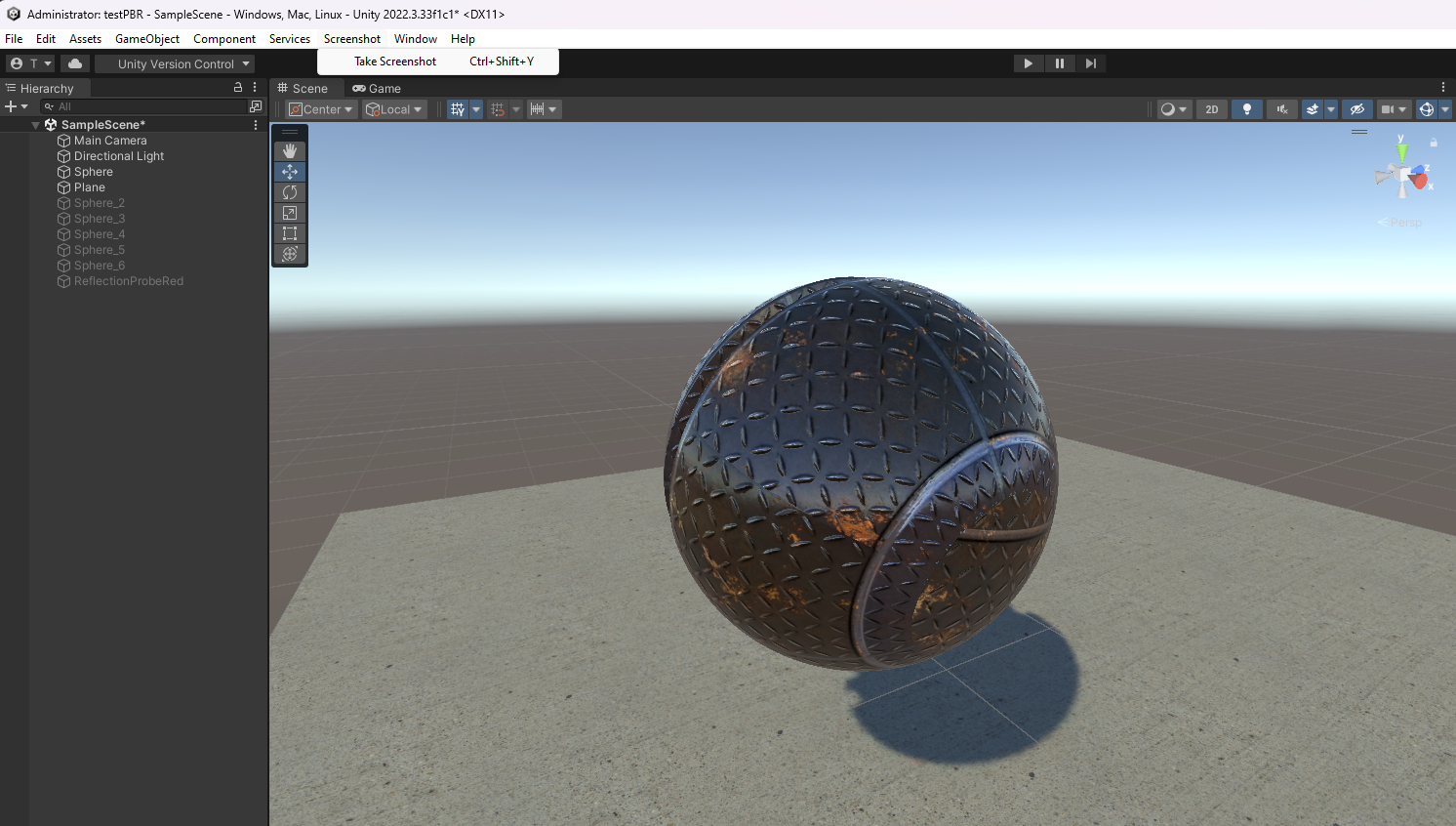
}修改编辑器UI,作为菜单使用;需要放到scene文件同目录的Editor目录下
效果如下:Editor/ScreenShotTest.csview raw 1
2
3
4
5
6
7
8
9
10
11
12
13
14
15
16
17
18
19
20
21
22
23
24
25
26
27
28
29
30
31
32
33
34using System.IO;
using System.Threading.Tasks;
using UnityEditor;
using UnityEditorInternal;
using UnityEngine;
public class ScreenShotTest : MonoBehaviour
{
//ctrl + shift + y 截图
[]
private static async void Screenshot()
{
string folderPath = Directory.GetCurrentDirectory() + "\\Screenshots";
if (!Directory.Exists(folderPath))
{
Directory.CreateDirectory(folderPath);
}
var timestamp = System.DateTime.Now;
var stampString = string.Format("_{0}-{1:00}-{2:00}_{3:00}-{4:00}-{5:00}", timestamp.Year, timestamp.Month, timestamp.Day, timestamp.Hour, timestamp.Minute, timestamp.Second);
ScreenCapture.CaptureScreenshot(Path.Combine(folderPath , stampString + ".png"));
Debug.Log("截图中......");
//等待5秒
await Task.Delay(5000);
System.Diagnostics.Process.Start("explorer.exe", folderPath);
Debug.Log("截图" + stampString + ".png");
}
void OnMouseDown()
{
ScreenCapture.CaptureScreenshot("SomeLevel.png");
}
}
C++特化模板的内部匹配参数代码解析
本文解析ghc::filesystem的一段模板代码,涉及模板特化/偏特化的参数也需要模板参数的情形,以及std::enable_if的使用。
C++特化模板的内部匹配参数代码解析
C++模板成员函数可以是虚函数吗
C++模板成员函数可以是虚函数吗
引言
在C++编程中,虚函数和模板都是强大的特性,但它们不能结合使用。许多开发者都会疑惑:为什么不能声明虚函数模板?这个限制背后的技术原理是什么?本文将深入探讨这个问题,分析技术可行性,并讨论可能的解决方案。
SVD求解配准的推导过程
配准误差函数
下面整理配准中计算推导过程,包含:平移
如何入门大模型
本文内容来自大模型生成和知乎回答
Claude-Sonnet-4
我为你规划一个系统的学习路径:
mediapipe人脸关键点序列
MediaPipe人脸关键点指南
人脸关键点的数量
根据Claude-Sonnet-4的介绍,标准版本是468个,优化版本是478个,添加左右眼虹膜关键点。看下面的关键点参考图能看到,虹膜关键点的起始序号正好是468。 > 478个关键点是MediaPipe Face Mesh的最新升级版本的结果(通常称为 Refined Mesh Model)。相比于标准的468个关键点版本,新增的10个关键点主要分布在 虹膜(瞳孔)区域,用于更精确地描述眼睛的几何形状和运动。
A Multiresolution 3D Morphable Face Model and Fitting Framework
贡献
提供了名为SFM(Surrey Face Model)的人脸模型,包含不同的分辨率层次和标注landmarks,让人脸模型的拟合更快;同时开源了一个3DMM人脸重建的代码框架,促进社区的研究。 - Surrey Face Model,包括开源非商用版本和商用版本 - eos: A lightweight header-only 3D Morphable Face Model fitting library,代码框架